Shipping to Canada
Save up to 50%

Shipping to the U.S.
Save up to 75%

Shipping Internationally
Save up to 85%

Same Day Delivery
Across the GTA

Returns
Lowest rate on the market
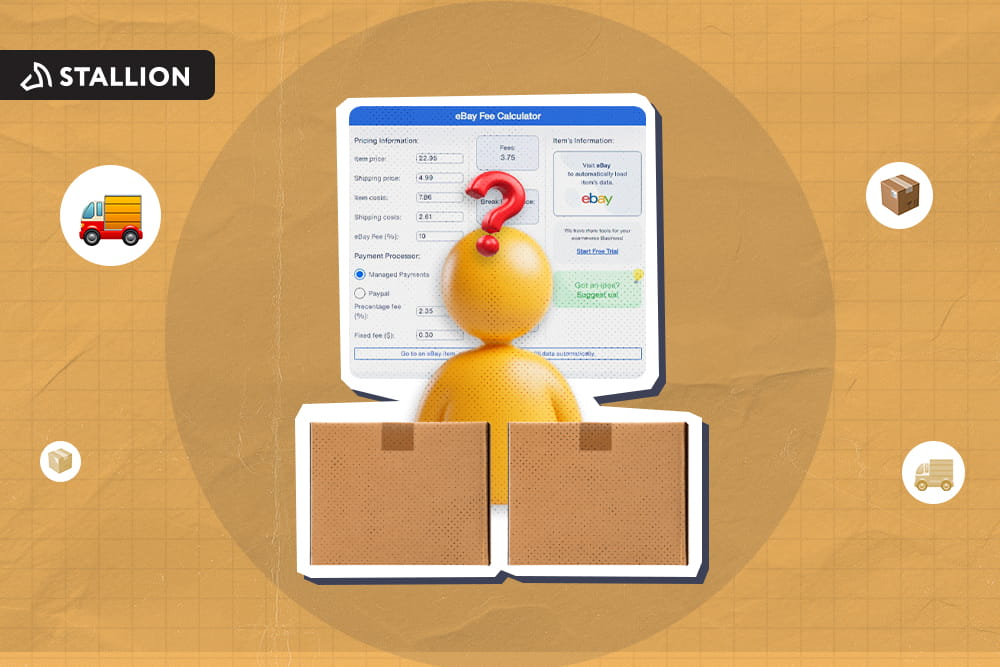
Every sale on eBay comes with a cost, but sometimes, with a bit of guessing in between. An eBay rate calculator is the easiest way to see exactly what that cost is before you list an item. Running the numbers through this tool ahead of time can help you catch that gap before it eats into your bottom line.
But how does it exactly work? This guide discusses:
If you're ready to start selling on eBay, know that there are selling fees you need to pay before you can list your products. Here is what Canadian sellers are working with in 2026:
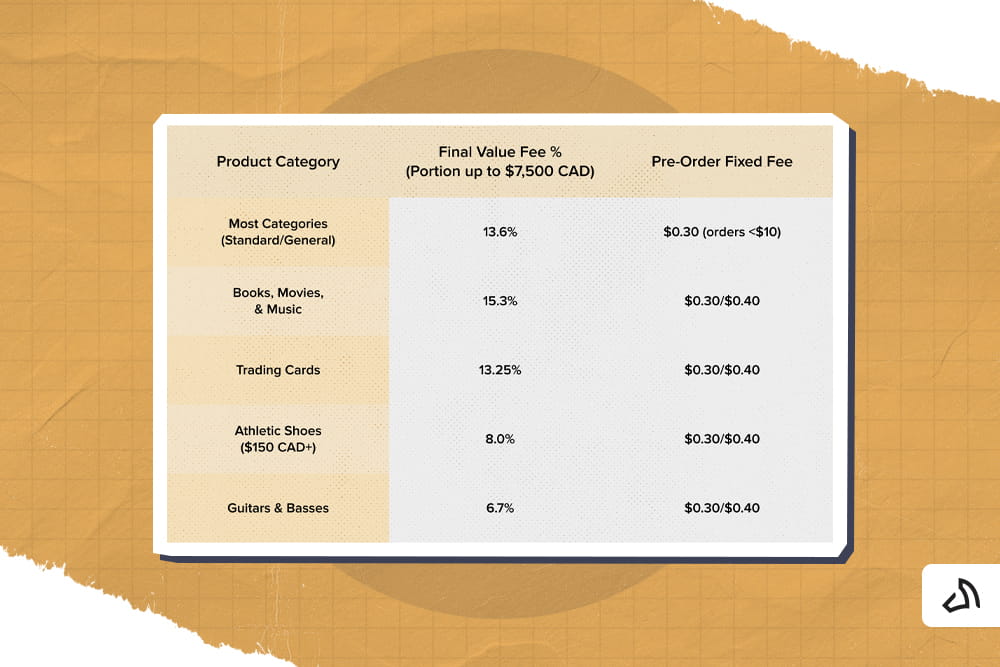
Note that rates range from roughly 2.5% to 15.3% depending on the category. So, always check the exact percentage for your product type. You can refer to the image above or go to eBay's official seller fee page to see how much each is before pricing a new listing.
Additionally, sellers with a Below Standard performance rating pay an additional fee on top of the standard rate. Meanwhile, sellers with a high rate of "item not as described" returns in certain categories may also pay an extra fee.
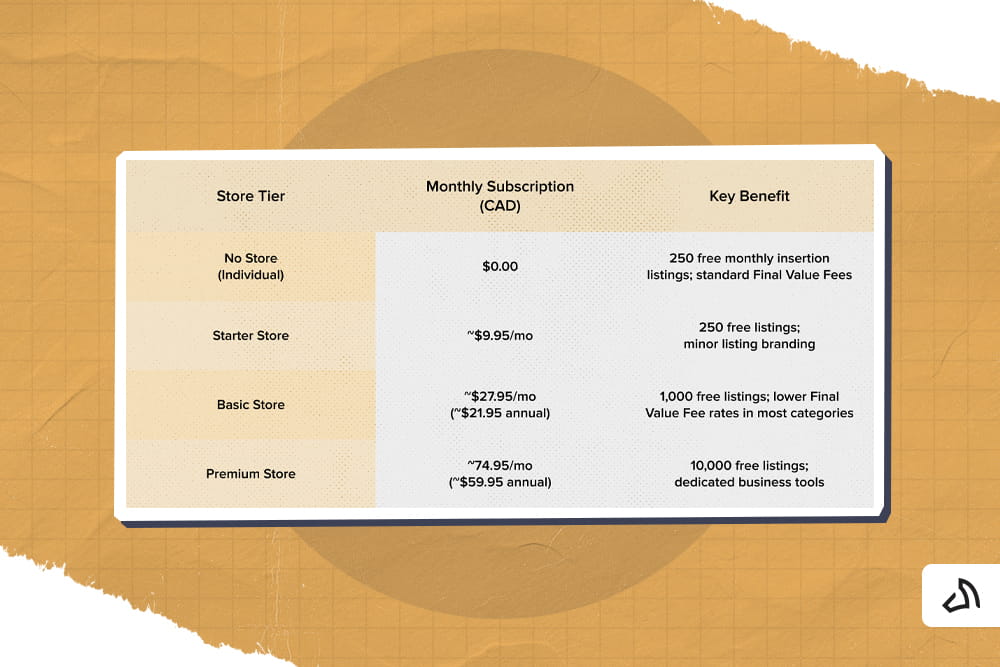
Store subscription costs are lower when billed annually than month-to-month. Also, an Anchor Store is available for high-volume sellers doing $30,000 or more in monthly sales. It's an offer beyond the Premium option, and includes an even larger listing allowance and dedicated support. Of course, it also comes at a higher monthly cost.
Do you already know the fee percentages and Store tier that apply to you? The next step is turning those numbers into an actual profit figure for a specific listing. Here are clear steps to calculate your eBay fees:
Use this formula to find your real profit on any eBay Canada sale:
Net Profit = Sale Price − Final Value Fee − Per Order Fee − Cost of Goods − Shipping Cost − Packaging Cost
Where:
Final Value Fee = (Item Price + Shipping Charged to Buyer + Sales Tax) × Category FVF %
For example:
You sell an item for $60, charge $10 for shipping, and no sales tax on the sale. Your item cost $20, actual shipping cost $8, and packaging cost $1.
Using the standard 13.6% final value rate and a $0.40 per order fee, it will be:
Shipping is often the biggest variable in a Canadian seller's profit calculation. Yet, it is easy to underestimate.
Canada Post, being the country's national carrier, is always the first option for many Canadian businesses. That said, it's not always the cheapest option, especially if you're shipping in volume.
Things are changing now, though, as shipping platforms offer reduced rates from major carriers. A seller can save up to 50% compared to Canada Post's retail pricing.
If you're shipping into the US, cross-border companies can also be significantly cheaper. They offer more cost-effective rates than shipping directly through Canada Post's standard international service. This is especially true for parcels under a few pounds.
Like any other industry, shipping isn't one-size-fits-all. Shipping rates don't have to be uniform across all orders. Instead, use eBay's shipping rate tables to set different fees based on the buyer's location.
This tool makes it easier to charge more accurately for shipments heading to remote provinces or territories. Plus, you can set separate rates for domestic Canadian, US, and international orders.
Setting up rate tables correctly prevents two crucial situations.
If you sell to US buyers while based in Canada, you have two basic options:
Note that eBay's conversion includes a markup over the mid-market exchange rate. This quietly reduces your payout on every USD sale. So before deciding which way to list, check eBay's current conversion rate and markup. Then, compare it against what your bank or payment provider would charge on the same transaction.
So, let's say your payment provider is PayPal. You must consider the PayPal fees first before deciding because small percentage differences add up quickly at higher sales volumes.
As mentioned, Top Rated Seller status gives you a discount on the percentage portion of your final value fee. If you want to qualify, it generally requires:
The discount applies to every sale going forward. Thus, it is one of the few fee reductions that requires no extra spending, only consistent performance.
Again, the amount you pay and the number of listings you can put up depends on your chosen Store subscription. It all comes with a fixed monthly cost, so run the math before upgrading.
But how do you do this?
Just multiply your typical monthly sales by the percentage point difference between your current rate and the Store rate. Then, add the value of any listings you would otherwise pay insertion fees on.
If that total is higher than the subscription cost, it is time to upgrade.
Retail shipping rates rarely make sense for a growing eCommerce business. Discounted shipping platforms built for Canadian sellers can meaningfully lower the cost side of the profit formula. This can be more relevant for cross-border shipments into the US, where rate differences between carriers can be significant.
The shipping fee you're supposed to charge your customers is not part of your final value fee calculation. So, overcharging for shipping will only increase your fees but not necessarily your margin.
Thus, it's best to use the built-in shipping calculator or your carrier's actual rate charts to set fees that reflect real cost. As for your profits, rely on competitive pricing per item rather than shipping markups to build them.
This will be very helpful if you're planning to sell (or already selling) to US buyers.
If you list in USD, build the currency conversion markup into your pricing rather than discovering it after payout. Check eBay's current conversion rate periodically. It can shift, and adjust your USD prices if the markup starts eating further into your margin than expected.
Related Post: Ultimate Guide to the eBay International Shipping Program for Beginners

When you issue a full refund to a buyer for an order cancellation or return, you will receive a variable (percentage-based) Final Value Fee and any Promoted Listings fees. However, eBay keeps the fixed per-order fee ($0.30 or $0.40). If you issue a partial refund, eBay automatically credits a prorated portion of the variable fee based on the refunded amount.
Yes. US buyers are responsible for import duties, sales taxes, and carrier brokerage fees on Canadian purchases. However, items manufactured in North America enter duty-free under CUSMA/USMCA.
With the eBay International Shipping (eIS), you don't have to manage international customs or overseas returns directly. You ship your sold items to eBay's designated domestic hub in Canada. From there, eBay handles international delivery, customs documentation, and all international return requests or lost package claims.
Standard (non-store) Canadian accounts receive 250 zero-insertion-fee listings per calendar month. Once you exceed this threshold, eBay charges a non-refundable insertion fee of $0.30 per additional listing.
After a buyer pays, eBay typically holds the funds in processing for 1 to 2 business days before releasing them. Once initiated, electronic bank transfers take 1 to 3 additional business days to clear into your Canadian bank account. You can set your payout schedule to daily, weekly, bi-weekly, or monthly depending on your cash flow needs.
The fee structure is not meant to confuse you, but it does reward businesses who understand exactly how it works. Once you know the process, you can price with confidence instead of guessing at your margin after the sale.
The formula and examples in this guide are just a way for you to check that math on every listing. It's still up to you how you use them to grow your profit and your business.

The fees are only one side of the profit equation. What you pay to actually ship each order is the other, and it is often the side you have the most control over. Stallion helps Canadian eBay sellers keep more of what the fee calculator says they should be earning, with:
Join Stallion for free and start shipping smarter today.

Jose is Stallion's Senior Business Analyst. He helps improve the company’s shipping processes, works closely with delivery partners, and looks at shipping data to find the best prices for our customers. Outside of work, Jose has a passion for running, regularly completing 5k and 10k runs, with the goal of running a full marathon in the near future.



Can our fellow Torontonians relate?
-
#smallbusiness #business #entrepreneur #socialmedia #shipping #ecommerce #canadianecommerce #shopify #poshmark #b2b #saas #etsy #ebay #canada #canadiansmallbusiness #shoplocalcanada #entrepreneur
#toronto

Here’s your quick hassle free shipping from 🇨🇦 to 🇺🇸 as a business owner!
-
Any questions?! Leave them 👇🏻 and save this video so you don’t forget!
-
#smallbusiness #business #entrepreneur #socialmedia #shipping #ecommerce #canadianecommerce #shopify #poshmark #b2b #saas #etsy #ebay #canada #canadiansmallbusiness #shoplocalcanada #entrepreneur
Meet @drinkbenny a 🇨🇦 female founded energy drink brand! Instead of focusing on their products, they’re taking a unique approach by hosting in person events in different Canadian cities to offer an experience for their community 🧡
-
What are your thoughts on in person events? 💭
-
#smallbusiness #business #entrepreneur #socialmedia #shipping #ecommerce #canadianecommerce #shopify #poshmark #b2b #saas #etsy #ebay #canada #canadiansmallbusiness #shoplocalcanada #entrepreneur
Do you know the difference between DDU and DDP when shipping internationally 🌏 ?
-
Questions? Leave them below! 👇🏻
-
#smallbusiness #business #entrepreneur #socialmedia #shipping #ecommerce #canadianecommerce #shopify #poshmark #b2b #saas #etsy #ebay #canada #canadiansmallbusiness #shoplocalcanada #entrepreneur
Here’s a quick hack to save time from choosing multiple postage options
↪️ Turn on the lowest postage rate automation to save you time!
-
Questions? Leave them below! 👇🏻
-
#smallbusiness #business #entrepreneur #socialmedia #shipping #ecommerce #canadianecommerce #shopify #poshmark #b2b #saas #etsy #ebay #canada #canadiansmallbusiness #shoplocalcanada #entrepreneur