Shipping to Canada
Save up to 50%

Shipping to the U.S.
Save up to 75%

Shipping Internationally
Save up to 85%

Same Day Delivery
Across the GTA

Returns
Lowest rate on the market
A customer says their package never arrived. You check the tracking, and it shows "Delivered." So the next step is to prove it.
Stallion now shows Proof-Of-Delivery (POD) photos from the carrier directly in your dashboard once made available by the carrier.
Find them yourself in a few clicks and share them with your customer. You no longer need to contact the Stallion support team and wait for a reply.
Proof of delivery is a photo the carrier takes when they deliver the package. It typically shows where the carrier left the package, such as on a doorstep, porch, or in a parcel locker.
A POD helps you:
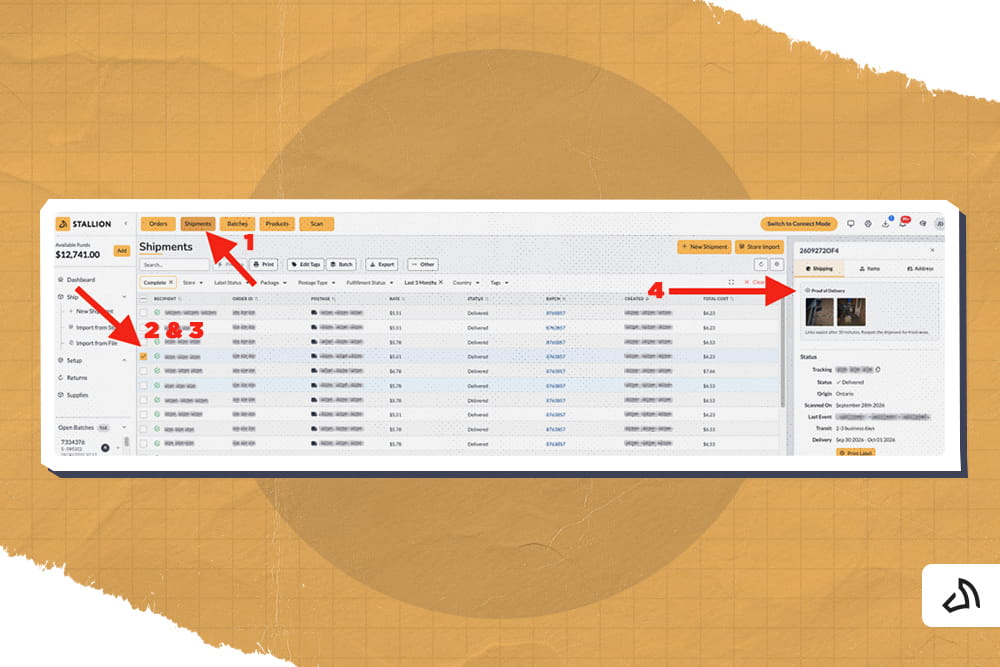
Follow these steps to view a POD for any delivered shipment:
Log in to your Stallion account and select Shipments from the top menu.
Use the search bar to find the shipment. You can search by recipient name or order ID. Use the filters to narrow the list by store, carrier, or date range.
Tick the checkbox next to the shipment. A details panel opens on the right side of the screen.
In the right-hand panel, find the Proof of Delivery section. The delivery photos appear at the top of the Shipping tab. Below the photos, the panel also shows the tracking number, delivery status, and the last tracking event.
Not every carrier provides proof of delivery. A POD appears in your dashboard only when the carrier for that shipment offers it.
Carriers that currently provide PODs:
If a shipment uses a carrier that does not provide PODs, the Proof of Delivery section will not appear in the panel.
Many brands have a separate customer service team that handles missing package requests. You can give these team members access to shipments and PODs without giving them full access to your Stallion account.
To do this, create a sub-user account with limited permissions.
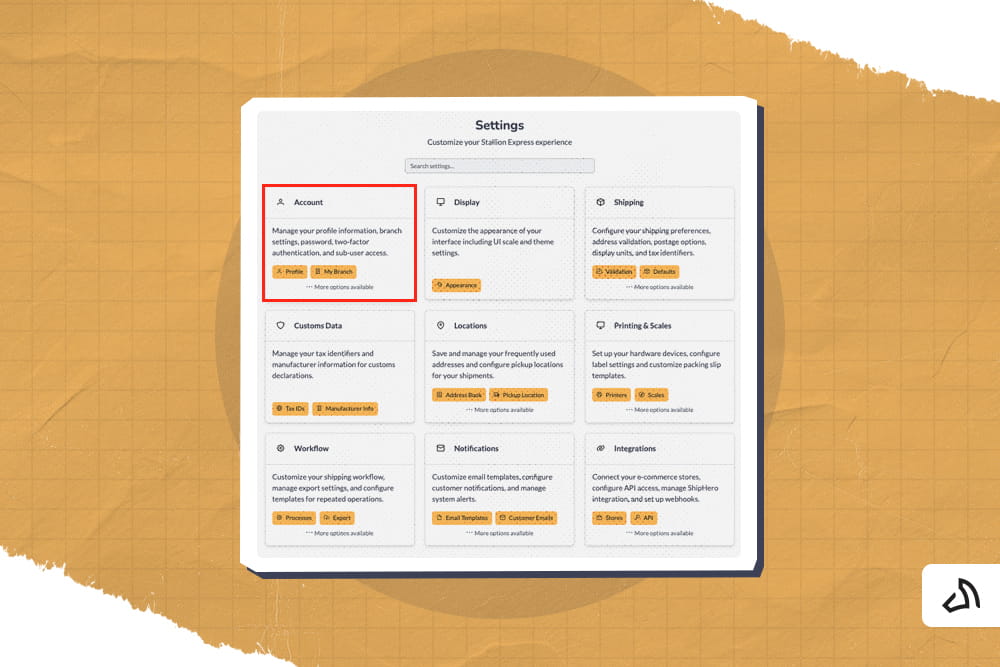
2. Open the Sub Users tab.
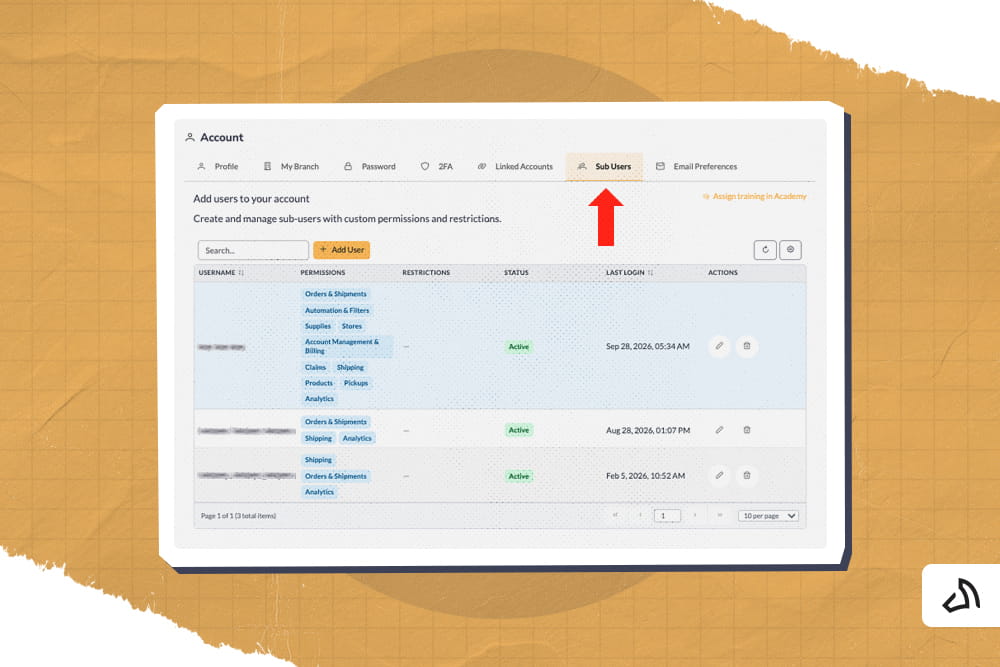
3. Select Add User.
4. Enter the new user's account details.
5. Open the Permissions tab.
6. Select only Orders & Shipments. This permission allows the user to view orders, shipments, and returns.
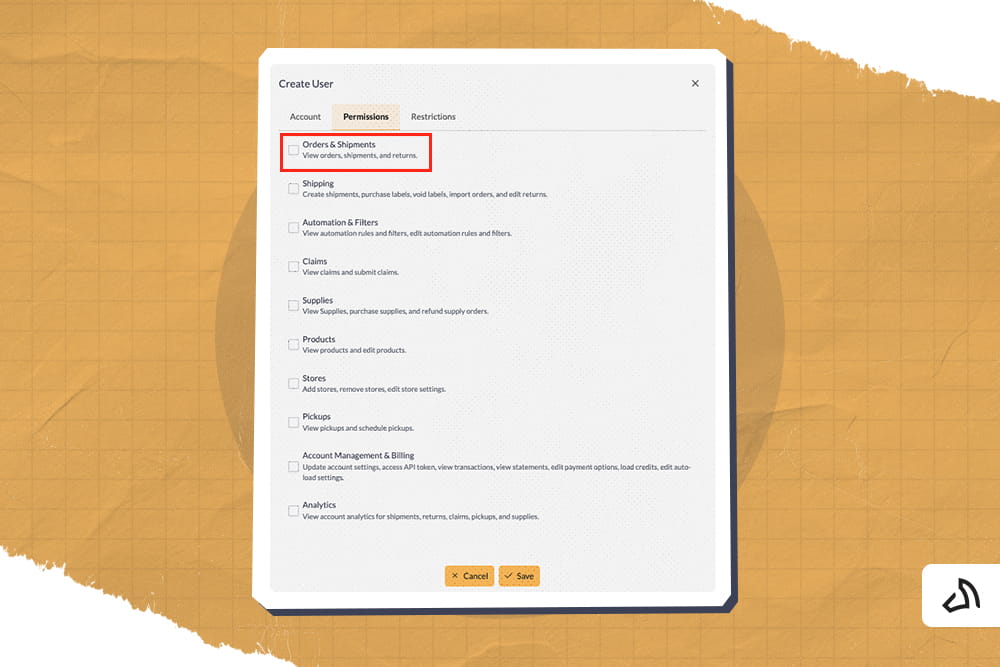
7. Select Save.
The user can now search for shipments and view PODs. They cannot create labels, access billing, or change account settings.
With POD access in your dashboard, you can:
The next time a customer reports a missing package, open the shipment in your Stallion dashboard and check for the POD. If you need help, contact the Stallion support team.

Jose is Stallion's Senior Business Analyst. He helps improve the company’s shipping processes, works closely with delivery partners, and looks at shipping data to find the best prices for our customers. Outside of work, Jose has a passion for running, regularly completing 5k and 10k runs, with the goal of running a full marathon in the near future.
Can our fellow Torontonians relate?
-
#smallbusiness #business #entrepreneur #socialmedia #shipping #ecommerce #canadianecommerce #shopify #poshmark #b2b #saas #etsy #ebay #canada #canadiansmallbusiness #shoplocalcanada #entrepreneur
#toronto

Here’s your quick hassle free shipping from 🇨🇦 to 🇺🇸 as a business owner!
-
Any questions?! Leave them 👇🏻 and save this video so you don’t forget!
-
#smallbusiness #business #entrepreneur #socialmedia #shipping #ecommerce #canadianecommerce #shopify #poshmark #b2b #saas #etsy #ebay #canada #canadiansmallbusiness #shoplocalcanada #entrepreneur
Meet @drinkbenny a 🇨🇦 female founded energy drink brand! Instead of focusing on their products, they’re taking a unique approach by hosting in person events in different Canadian cities to offer an experience for their community 🧡
-
What are your thoughts on in person events? 💭
-
#smallbusiness #business #entrepreneur #socialmedia #shipping #ecommerce #canadianecommerce #shopify #poshmark #b2b #saas #etsy #ebay #canada #canadiansmallbusiness #shoplocalcanada #entrepreneur
Do you know the difference between DDU and DDP when shipping internationally 🌏 ?
-
Questions? Leave them below! 👇🏻
-
#smallbusiness #business #entrepreneur #socialmedia #shipping #ecommerce #canadianecommerce #shopify #poshmark #b2b #saas #etsy #ebay #canada #canadiansmallbusiness #shoplocalcanada #entrepreneur
Here’s a quick hack to save time from choosing multiple postage options
↪️ Turn on the lowest postage rate automation to save you time!
-
Questions? Leave them below! 👇🏻
-
#smallbusiness #business #entrepreneur #socialmedia #shipping #ecommerce #canadianecommerce #shopify #poshmark #b2b #saas #etsy #ebay #canada #canadiansmallbusiness #shoplocalcanada #entrepreneur